Wednesday, March 04, 2020

CaseConverter 2.0 | Improved version with new features and optimizations

CaseConverter 2.0 is released with new UI, features and a lot of optimizations.

https://caseconverter.in/

New Features:

  • Copy Result Text to the clipboard
  • Character and Word Count


Optimizations:

  • Works fluently in mobile (fully responsive now)
  • Works without Internet as well

PWA:
CaseConverter is a Progressive Web App which you can install on your mobile phone. It works seamlessly without the internet as well.

Case Converter is a free online tool to convert the case of any text to either lower case, upper case, proper or sentence case. Accidentally left the caps lock on and typed something, but can't be bothered to start again and retype it all? Simply paste your text and choose the case you want to convert it to.

Monday, October 31, 2016

Kaala Chashma dance video by employees of Perk.com, Bangalore

Perk.com Bangalore office's employees performing the song Kaala Chashma on the Diwali Celebration Day 2016.


Monday, December 01, 2014

Best custom login plugin for wordpress - Erident Custom Login

To complete the white branding of WordPress, you need to customize the WordPress's default login page (wp-login.php) as well. For doing this, you can seek the help of a custom plugin or you can write the code with the help of wordpress codex

Here I'm introducing you the free powerful plugin Erident Custom Login and Dashboard to customize your login page very easily.

Check this beautiful page created using Erident Custom login plugin:


Easy steps to install the plugin:

  1. Goto WordPress Dashboard -> Add new plugin and search "erident"
  2. Click Install button on "Erident Custom Login and Dashboard"
  3. Activate the plugin through the 'Plugins' menu in WordPress
  4. Go to the plugins options page in the WordPress admin ('Settings' -> 'Custom Login and Dashboard')
  5. Change the footer texts, images, colors, styles as you desire
  6. Enjoy your completely branded WordPress Version
With the latest version, you can add form background opacity as well! It supports German, French and Spanish as well.

With it's Import/Export feature, you can download a custom theme you created and can use it on another website as well.

The plugin already crossed 1 lakh downloads with an excellent rating of 4.9/5 stars.

Download Erident Custom Login Plugin


Install the plugin and play around with it's options. Also don't forget to rate the plugin :)

Friday, November 01, 2013

New Version of Erident Custom Login and Dashboard Released (ver:2.0.0)

Hello Everyone,

The brand new version of Erident Custom Login and Dashboard Released WordPress Plugin released yesterday with new features and enhanced UI.


With more than 42,000 downloads at 4.9/5 rating, the plugin continues it success!
You can customize completely your WordPress Login Screen page with Erident Plugin.

Features:

  • Change footer texts on Admin Dashboard
  • Add Image/Color Backgrounds to Login Screen.
  • Add Image/Color Background to Login Form.
  • Pick color using awesome jQuery color picker
  • Change Texts/Links Color and size on Login Form
  • Replace the WordPress Logo on the Login Form with your own (Now support your own size logo).
  • Enable/Disable shadow for the Links on Login Form
  • Enable/Disable shadow for the Login Form
  • Preserve previous settings upon WordPress/plugins update!
It gives Fastest support for the plugin. If you have any queries, visit the WordPress support forum.

DOWNLOAD THE PLUGIN HERE

If you love the plugin, please give a 5 STAR rating in the review section.

Saturday, July 28, 2012

WordPress Plugin: Erident Custom Login and Dashboard


Brand New plugin for customizing completly your WordPress Login Screen and Dashboard easily. Add your logo, change background image, colors, styles ,Dashboard footer etc.


Features:
  1. Change footer texts on Admin Dashboard
  2. Add Image/Color Backgrounds to Login Screen.
  3. Add Image/Color Background to Login Form.
  4. Pick color using awesome jQuery color picker
  5. Change Texts/Links Color on Login Form
  6. Replace the WordPress Logo on the Login Form with your own.
  7. Enable/Disable shadow for the Links on Login Form
  8. Preserve previous settings upon WordPress/plugins update!

Click Here to Download from the WordPress Repository Now

Thursday, June 14, 2012

WordPress 3.4 “Green” Released

WordPress 3.4 released. This release “Green” is in honor of guitarist Grant Green.

This release includes significant improvements to theme customization, custom headers, Twitter embeds, and image captions 


For Users

The biggest change in 3.4 is the theme customizer which allows you to play around with various looks and settings for your current theme or one you’re thinking about switching to without publishing those changes to the whole world. For themes that support it, you can change colors, backgrounds, and of course custom image headers.
Throughout the rest of the admin you’ll notice tweaks to make your everyday life easier. For example, if you have lots of themes we’ve made it quicker to browse them all at once without paging. We’ve made it possible to use images from your media library to populate custom headers, and for you to choose the height and width of your header images.
WordPess expanded ttheir embed support to include tweets: just put a Twitter permalink on its own line in the post editor and it will turn it into a beautiful embedded Tweet. And finally, image captions have been improved to allow HTML, like links, in them.

For Developers

There are hundreds of under-the-hood improvements in this release, notably in the XML-RPC, themes, and custom header APIs, and significant performance improvements in WP_Query and the translation system. The Codex has a pretty good summary of the developer features, and you can always dive into Trac directly.


Friday, June 08, 2012

Hammer and Nail

When the only tool you keep in your box is a hammer, everything starts to look like a nail.


Sunday, April 08, 2012

Happy Easter 2012

Let me take this time to extend happy Easter Wishes to all my dearest friends and family.
Celebrate the day and enjoy the holiday with your loved ones..

Warm Regards,
Libin

Friday, March 09, 2012

Case Converter | An Online tool to convert the case of any text

Did you Accidentally left the caps lock on and typed something, but can't be bothered to start again and retype it all?


Then try this toolCase Converter is a free online tool to convert the case of any text to either lower case, upper case, proper or sentence case. Simply paste your text and choose the case you want to convert it to.
There is an option to download your result to a .txt file.

Case Converter | An Online tool to convert the case of any text

Tuesday, February 21, 2012

Hanimex Tele 110 TF 25mm/43mm Vintage Film Camera for Sale


Hanimex Tele 110 TF 25mm/43mm Vintage Film Camera
Hanimex Tele 110 TF 25mm/43mm Film Camera

  • Takes 2x AA Batteries
  • 2 shutterspeeds.
  • One stand.
  • Built in flash.
  • Bult in telelens.
  • 25 / 43 mm.


Manufactured by:
Hanimex. Hong Kong.


Size:
13 x 17 mm.


Film type:
110.

Interested persons please contact me at libinvbabu@gmail.com with your price.
.

Friday, December 09, 2011

Create Don 2 Poster with your Face in it - Snapora


Create Don 2 Poster with your face on it !

Create your Don 2 Poster replacing shahrukh khan with your face with one click. Upload your photo and click create for perfect Don 2 poster. Its simple and FREE. No registration required
Visit: http://www.snapora.com/

See some samples below:


Tuesday, December 06, 2011

Where is my blog ? #145 mysql error - Wordpress fix tutorial


Today morning I got an email from my client that his wordpress blog is no more. I quickly ran into his blog and shocked ! There is no posts or pages in the blog. When I logged in to the wordpress dashboard, I saw the same. There is zero posts, zero pages...

I really wondered what happened there. Then I logged into the phpMyAdmin and check the database. when I clicked 'wp_posts' table, it shows the following error.
"#145 - Table './DB_NAME/wp_posts' is marked as crashed and should be repaired"

I googled for the #145 error and found there is a fix for it. We can repair the crashed table.
I had explained it below with necessary screenshots.
1. Login to your phpMyAdmin and select the wordpress database.
2. Then select the checkbox of wp_posts tabel.


2. Then in the bottom dropdown list select "Repair Table".


3. Done. You will get the success message.


Now check the blog again. You will shock again that the blog posts and all other pages are back !! :)

Alternatively you can fix this error my executing the SQL query:  REPAIR TABLE `wp_posts` 
Well, the database tables should not crash by themselves. Problems are usually of a misconfiguration mysql server. Anyway you can fix this error easily.

Comment back if this post helps you.

Wednesday, November 23, 2011

Send Free Messages form your mobile (Local And International) - JaxtrSMS


Introducing FREE Message from your mobile to anywhere in the world!
Send messages to all in your address book whether they have the app or not.

JaxtrSMS lets you send FREE SMS / text messages to any mobile phone in the world
Best of all, the receiver does not have to have the JaxtrSMS app. International and local SMS/texting can be expensive but with JaxtrSMS you can text anyone in the world for FREE! All you need to do is download JaxtrSMS and start sending messages.
JaxtrSMS links directly to your address book so you can send messages to anyone whether they have JaxtrSMS or not.

Sabeer Bhatia, the founder of Hotmail.com, on Tuesday launched JaxtrSMS, a mobile application that lets users send unlimited free text messages to any other phone anywhere in the world.


How does it work? 
Use JaxtrSMS to send and receive messages with any other mobile phone in the world forFREE.

1. Recipient does not have to be a user
2. Send a text message to any other mobile phone, domestic or international.
3. Use your own phone number

•  Goes direct to SMS inbox and behaves like regular SMS.
•  Also works on tablets.
•  Use your own number or buy a new global phone number.


Save Money - Send text messages for FREE.
Save Time - works on WiFi & 3G and all devices
Instant Delivery - our app to app delivery of messages is instant

Supports on all major platforms:
Visit Android Market
Visit iTunes Market
Visit BlackBerry App World
Windows
Visit Java App Store
Visit Symbian App Store
Visit Nokia App Store

Drawbacks:
• Messages delivered late ±15 min for users who doesn't have this app.
• No delivery notification.
• Ads comes with the every message sent. Hope they will remove it soon.


Tuesday, November 01, 2011

Doordarshan Malayalam - Old News Tiltle Music


DD Malayalam news Varthakal from its inception in 1985 has become an addiction for Malayalee viewers for the style of presentation and clarity of content.
Now the channel sustains a nominal presence only due to its capabality for terrestrial transmission, which is available without a cable provider.
But we will never forget this old news music!!

Kerala Piravi gift for all malayalees. Here is the old DD Malayalam News - Title Music.
Share and Enjoy.

Friday, October 21, 2011

Secret Of Success in Life


A Successful man is one who earns more
money than his wife can spend..

And


A succeessful woman is one
who can find such a man !

Thursday, October 20, 2011

Namma Metro Rail Opens in Bangalore


Namma Metro - Logo


The first metro in India's IT hub of Bangalore rolls into service on Thursday(20-10-2011), a long-delayed and over-budget project to help the city's army of commuting software engineers and call centre staff.
Bangalore Metro is a mass-transit rail system for the city of Bangalore, India.  The first stretch is between Baiyyappanahalli to M.G. Road (6.7 kilometres)

Inauguration of Namma Metro by Mr. D.V. Sadananda Gowda, Chief Minister of  Karnataka

Traffic, as in all Indian cities, has grown exponentially in recent years, making travelling to work a miserable experience for the estimated eight million inhabitants who cram into cars, rickshaws and buses.

No other city in the country has such a high ratio of vehicle-population density. This is because there is no efficient public transport system and the road infrastructure is poor.

The metro is expected to reduce the traffic volume in areas like Majestic (Kempegowda Bus station and Bangalore Railway Station), Sampige Road, Hudson Circle and M.G. Road.

The Bangalore Metropolitan Transport Corporation (BMTC) and Bangalore Metro Rail Corporation Ltd. (BMRCL) are also jointly introducing common day-pass that can be used both in metro and BMTC buses. According to a BMTC release, the Metro Bus Transit Day Pass for commuting in metro and BMTC non-air-conditioned buses is priced at Rs. 70. The Metro Bus Transit Day Pass for commuting in metro and all BMTC services except Vayu Vajra costs Rs. 110, the release said.

Monday, September 26, 2011

Its Rumor ! Facebook is free and not charge a single fee for profile changes

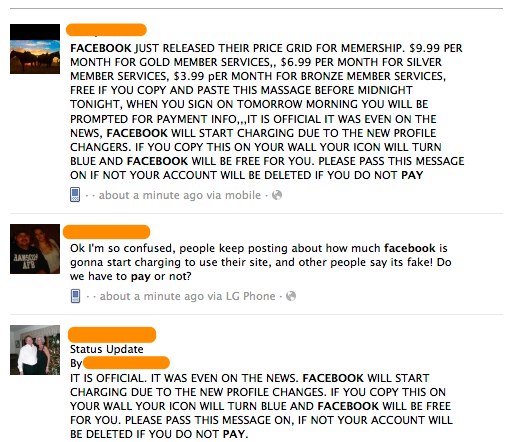
Its a completely untrue Rumor ! Facebook is free and will not charge a single fee for profile changes.

Ever since Facebook introduced Timeline profiles, several Facebook status updates have been spreading on the world’s social network that claim Facebook users will have to pay for the new profile changes.


An example of some of the many Facebook scam statuses


Here’s one of the messages currently spreading on Facebook:

“THIS IS OFFICIAL… IT WAS EVEN ON THE NEWS… FACEBOOK WILL START CHARGING DUE TO THE NEW PROFILE CHANGES… IF YOU COPY THIS ON YOUR WALL YOUR ICON WILL TURN BLUE AND FACEBOOK WILL BE FREE FOR YOU. PLEASE PASS THIS MESSAGE ON, IF NOT YOUR ACCOUNT WILL BE DELETED IF YOU DO NOT PAY!!”

And here’s yet another:

“FACE BOOK JUST RELEASED THEIR PRICE GRID FOR MEMBERSHIP. $9.99 PER MONTH FOR GOLD MEMBER SERVICES, $6.99 PER MONTH FOR SILVER MEMBER SERVICES, $3.99 PER MONTH FOR BRONZE MEMBER SERVICES, FREE IF YOU COPY AND PASTE THIS MESSAGE BEFORE MIDNIGHT TONIGHT. WHEN YOU SIGN ON TOMORROW MORNING YOU WILL BE PROMPTED FOR PAYMENT INFO...IT IS OFFICIAL IT WAS EVEN ON THE NEWS. FACEBOOK WILL START CHARGING DUE TO THE NEW PROFILE CHANGES. IF YOU COPY THIS ON YOUR WALL YOUR ICON WILL TURN BLUE AND FACEBOOK WILL BE FREE FOR YOU. PLEASE PASS THIS MESSAGE ON IF NOT YOUR ACCOUNT WILL BE DELETED IF YOU DO NOT PAY”

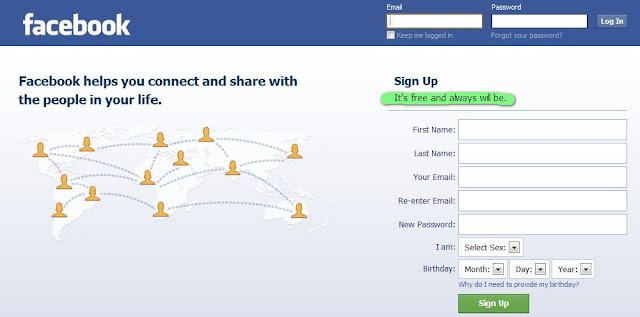
These rumors are simply untrue. “It’s free and always will be” is still in giant font on the Facebook homepage. Besides, Facebook is already making billions in revenue.  No monthly fees, no subscriptions to get the updates– everything is free (I mean, Facebook needs you to want to continue to use their site. It’s how they make billions selling ads).

So don't worry about these rumors. Enjoy using facebook.
To get the new Timeline features of facebook before its public release, simply go through this tutorial.
Tutorial to turn on facebook Timeline

Friday, September 23, 2011

Tutorial to turn on Facebook Timeline Beta before Public release

Facebook Introduces new feature "Timeline".
Facebook Timeline is such a new feature that it is still in beta stage and has not been totally rolled out yet. But you can try Facebook Timeline now. So how can you activate or enable Facebook Timeline?


This is how it looks like.


Before Activating:

  • Only you will see your timeline at first (unless you decide otherwise), but it will automatically go public after a few days.
  • Expect bugs.
  • You’ll need to have a “verified” account for one of the steps, which means you need a credit card or phone number attached to the account.

Activate your facebook timeline-beta features now.
  1. First you must have or create a Facebook App.
  2. Enable developer mode, if you haven’t already. To do this, type “developer” into the Facebook search box, click the first result (it should be an app made by Facebook with a few hundred thousand users), and add the app.
  3. Give the app a name and URL but don’t worry about having everything correct. Once we complete this process it will enable the feature for your Facebook account and you can forget about the app all together.
  4. Once your App is created, click on the App in the list on the left side of the page and then on the top right side of the page click edit app.
  5. Fill out the basic information about your app with whatever information you want, make sure that you enter information in the namespace section. See screenshot below.
Tips:

  1. You can use any valid URL, just make sure that you don’t put “http://” in the “app domain” section but doput it in the “site URL” section.
  2. You must use a unique value for your namespace but it can be anything that someone else has not chosen.
  3. Facebook App Basic Information
  4. Once you’re information is filled out and saved without error, click on “Open Graph” in the left column of the page.
  5. Enter an action and an object for users to do while using your app (again, this information can be made up) and click “Get Started“.
  6. Facebook Open Graph Action Object
  7. Open a new tab and go back to your Facebook profile.
  8. A box will appear asking if you want to get started with Facebook Timeline Beta for Developers. Enjoy!
Content courtesy to Anson Alexander and JEFF
Share your experience with new facebook timeline. !

Thursday, September 15, 2011

Its going to be raining


Its going to be raining in Bangalore. A typical view of Bangalore from my company side. 
The photo looks like an old age village, right?

Social Media

Share